Showing posts with label banner. Show all posts

Thursday, August 20, 2009

HTML what?

I can't believe I actually have the patience for it!


Like as if my work isn't enough to keep me busy, I found myself shuffling signs, symbols, letters, numbers, characters, HTML.

See? I've been using my good ol' Blogger template for over two years now. As much as I wanted to modify my blog layout earlier, I just don't have the patience needed to do so, not to mention uninterested to learn how. Obviously, reading dummy guides and tutorials has never gotten in my to-do list.

Alas! Out of no where, I started digging thru the world wide web for nice templates the other day. I set aside my "today" files and put some of them to "later", and the rest "tommorow". Figuring out how to make all these codes work has become my main concern. Enough with the stressful work related reading, typing, calling, emailing!

My battle with HTML is sorrowful! I ignored every how-to guides there is. I followed my own trial and error procedure. Hence, it took me hours to finish.

Actually, it's still unfinished. Perhaps, when (short) free time peeks once again?

Sunday, May 4, 2008

My zero Photoshop skills.


Been planning to change my banner since last month. I've always been aiming for an orange hued image before but after playing with the colors, i got that green instead, which I'm changing now.

This time I'm getting back the orange.


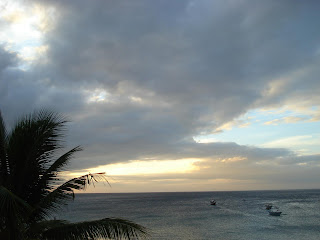
I chose to work with this photo. It was taken from a hotel window in Puerto Galera last February. I thought it best fits the Water World concept that i was talking about here

And because I am still convinced that Photoshop is the most complicated software ever created, I relied with the oh-so-simple, user friendly picture editor that came with the scanner i bought back in 2004.

It's called Ulead Photo Express. Actually I wasn't aware that it was installed in my computer. I wasn't paying attention to the installer except for the next button since all I wanted is my scanner to start working. I just discovered the Ulead icon on my desktop later on.

It has been my "photoshop" since then, my tool in editing pictures, including the banners that I used in this blog.

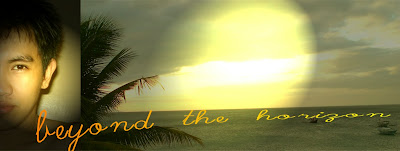
Back to the banner, I started by cropping the original photo horizontally. Wanting to insert my pic, i resorted to cutting my face into two, took the right side and pasted it right here:

I chose the text because i like how it laid flat in the end.

Viewing it full screen, I realize it's kinda boring so i added the spotlight effect. My 3 year old nephew picked this when i asked him which among the three is the best:


I had a hard time creating a good contrast between my picture and the original image so i got rid of my photo eventually, I thought it's ruing the entire look anyway, I also changed the text, so here's the end result:


It didn't make wonders like Photoshop could, but good enough for my blog.

Cheers!